
How to choose the right Mac for seniors: a simple buyers guide for 2026
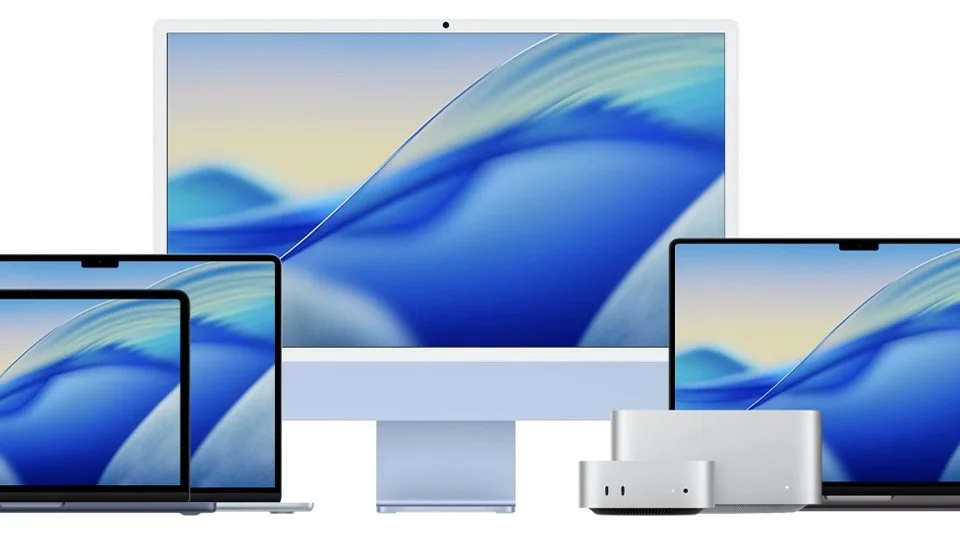
If you’re thinking about getting a new Apple computer, you may be wondering:
“Which Mac is right for me?”
Apple offers several options, and while they all look sleek and powerful, they are designed for different needs.
The good news? Most older adults don’t need the most expensive or powerful model… just something simple, reliable, and easy to use.
In this guide, we’ll walk through the best options and help you choose the right one.
What to Look for in a Mac (for Seniors)
Before choosing a model, focus on what really matters:
• Easy to use
• Clear, large screen
• Reliable performance
• Good value (not overpaying for power you won’t use)
iMac — Best All-in-One Desktop

The iMac is a desktop computer where everything is built into the screen.
Pros:
• Large, bright display
• Simple setup
• Clean, clutter-free design
• Great for email, browsing, photos, and video calls
Cons:
• Not portable
• Higher upfront cost than smaller options
• Takes up desk space
Best for:
Seniors who want a simple, comfortable home setup with a large screen and don’t plan on using their computer away from their desk.
Mac Mini — Best Budget Desktop Option

The Mac Mini is a small desktop computer that connects to a monitor, keyboard, and mouse.
Recent models use Apple’s powerful chips and offer strong performance in a compact size.
Pros:
• More affordable than an iMac
• Very small and space-saving
• Good performance for everyday tasks
• Flexible (you can use your own screen)
Cons:
• Requires separate monitor, keyboard, and mouse
• Slightly more setup required
• Can feel less “plug-and-play”
Best for:
Those who already have a monitor or want a lower-cost desktop setup.
MacBook Neo — Best Budget Laptop (New for 2026)

The MacBook Neo is Apple’s newest and most affordable laptop, designed for everyday use.
It features a lightweight design, a 13-inch display, and up to 16 hours of battery life.
Pros:
• Very affordable compared to other Macs
• Lightweight and portable
• Long battery life
• Simple and great for everyday tasks
• Ideal for email, browsing, and video calls
Cons:
• Less powerful than higher-end Macs
• Smallest display size of Apple’s laptops and smaller than desktops
• Limited storage and memory on base models
• Fewer ports and features
• Not ideal for heavy multitasking or advanced work
Best for:
Seniors who want an affordablelaptop for everyday use.
MacBook Air — Best Overall Laptop

The MacBook Air is one of the most popular laptops — and for good reason.
It’s lightweight, quiet, and very easy to use, making it ideal for everyday tasks like email, browsing, video calls, and photos. It also comes in two sizes: 13 and 15-inches.
Pros:
• Lightweight and portable
• High performance and long battery life
• Larger screen sizes available up to 15-inches
Cons:
• Smaller screen than desktop options
• High starting price than MacBook Neo
Best for: Seniors who want a higher-performance laptop that will last them several years into the future.
What About More Powerful Macs?
You may also hear about models like:
• MacBook Pro
• Mac Studio
These are powerful machines designed for:
• Video editing
• Graphic design
• Professional work
• Heavy multitasking
They use advanced chips with significantly more performance power.
Why They’re NOT Recommended for Most Seniors:
• Much more expensive
• More complex than necessary
• Extra power most people will never use
• For everyday tasks like email, browsing, photos, and video calls, these models provide more performance than you’ll likely ever need.
So, Which One Should You Choose?
Here’s a simple way to decide:
Choose an iMac if:
✔ You want a large screen
✔ You mainly use your computer at home
✔ You prefer a simple, all-in-one setup
Choose a Mac Mini if:
✔ You want a budget desktop option
✔ You already have a monitor
✔ You’re comfortable with a bit of setup
Choose a MacBook Neo if:
✔ You want something portable
✔ You’re on a budget
✔ You mainly use email, internet, and video calls
…
If Cost Is a Concern: Smart Ways to Save on a Mac
Mac computers are known for their quality — but they can also be expensive. The good news is that you don’t always need to buy the latest model to get a great experience.
Here are a few simple ways to save money while still getting a reliable Mac:
1. Consider an Older Model
You don’t need the newest version to do everyday tasks like email, browsing, video calls, and photos.
Even a Mac that’s 2–4 years old can work perfectly well for most people.
Why this works:
• Lower price
• Still fast for everyday use
• Often easier to find on sale
2. Buy Refurbished (Like New, But Cheaper)
Refurbished Macs are devices that have been tested, cleaned, and restored to full working condition.
They often come with:
• Warranty
• New battery or parts (if needed)
• Significant savings
Where to look:
• Trusted electronics retailers
This is one of the best ways to get a high-quality Mac at a lower cost.
3. Use a Hand-Me-Down Device
Many families upgrade their devices regularly, which means there may be a perfectly good Mac available from:
• Children
• Grandchildren
• Relatives
Why this is a great option:
• Often free
• Already set up by someone you trust
• Familiar support if you need help
In many cases, a slightly older device is more than enough.
Final Thoughts
For most seniors, the best computer isn’t the most powerful one… it’s the one that feels easy, comfortable, and reliable to use every day. If you’re still undecided, we recommend visiting your local Apple Store or reaching out to us directly for suggestions.